
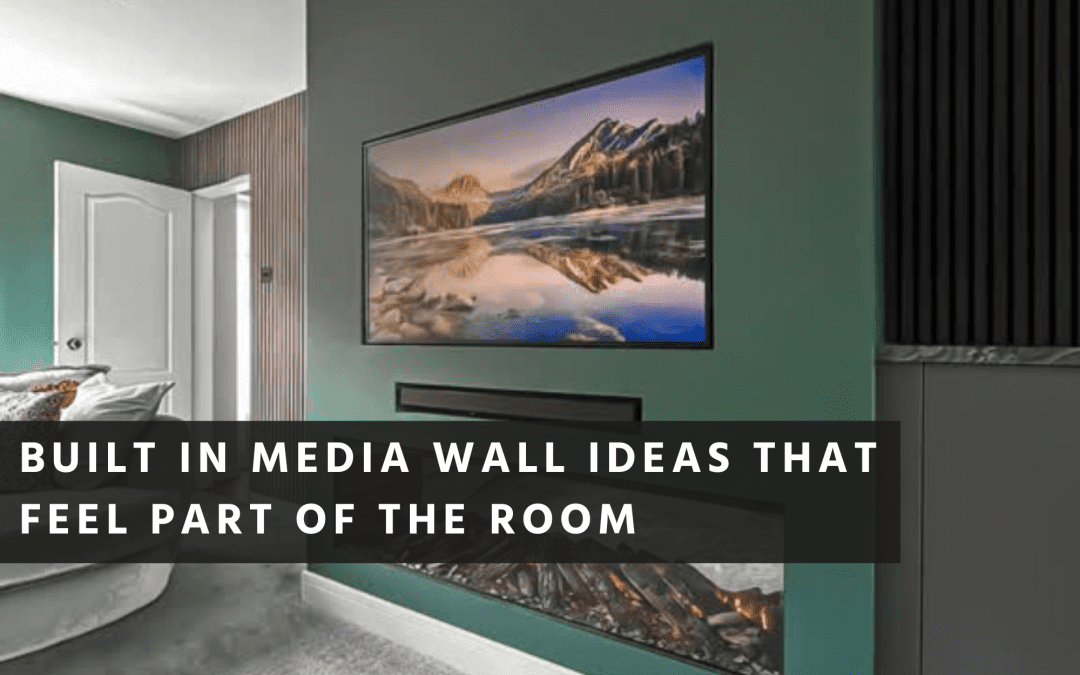
The media walls that look best aren’t the ones with the most features. They’re the ones where the TV, storage, lighting and joinery all feel like they belong to the room. Nothing looks added or trails. Nothing was worked out after the fact.
That comes down to planning the practical details first: what equipment the wall needs to house, where power and cables run, how storage is organised, and how the proportions relate to the room itself. Get those decisions right early and the finished wall looks properly integrated. Skip them and you spend the life of the wall managing cables, hiding boxes, and working around things that don’t quite fit.
What Makes a Media Wall Feel Built In
A media wall feels built in when it reads as part of the house, not as furniture placed against a wall. The TV sits at the right height, the joinery lines are consistent, and storage is where it’s actually useful rather than where it was easiest to build.
Four things determine whether it works:
Proportion and alignment. A clear centre line and balanced spacing so the wall has visual weight without feeling heavy.
A proper plan for power and cables. Sockets positioned behind the TV and inside equipment zones, with cable routes planned between them. No trailing leads.
Storage designed around real items. Routers, consoles, soundbars, remotes, chargers. Not generic shelves hoping things will fit.
Lighting that adds depth. Subtle enough to create atmosphere without reflecting on the screen.
If your aim is a calm, cohesive living space rather than a statement piece, it helps to approach the media wall as part of the room’s overall design. That’s how we approach our bespoke living spaces, where storage, finishes and layout are considered together.
Plan the Invisible Details First
The best-looking media walls start with the things you can’t see. Before thinking about shelves or finishes, list everything the wall needs to accommodate and what each item requires.
A typical list:
- TV and bracket
- Soundbar or speakers
- Set-top box or streaming device
- Games console
- Router or mesh node
- LED drivers and control boxes
- Fireplace, if you’re including one
Once you know what lives in the wall, you can decide where each item sits, where sockets go, and how cables route between zones. That planning is what prevents a media wall becoming a patchwork of afterthoughts.
Power, Sockets and Cable Routes
You don’t need to be an electrician to plan this well, but you do need to be clear about what you want. A tidy media wall typically needs sockets and data points in two locations: behind the TV for power and connections, and inside a ventilated storage area for boxes, consoles and routers.
It also needs a sensible cable route between the two, so you’re not feeding HDMI leads through improvised holes or squeezing them behind plasterboard.
If electrical work is part of the build, it must be safe and compliant. Approved Document P covers electrical safety in dwellings and is a useful reference for understanding why hidden wiring still requires proper planning and testing.
Cable Management That Lasts
Media walls shouldn’t be designed solely for today’s equipment. TVs change, soundbars change, and what you connect now may not be what you connect in two years.
The principles are straightforward: leave space for slightly larger equipment than you currently own, provide access to cables without dismantling the wall, maintain a clear route for additional cables if needed later, and avoid sealing everything behind fixed panels with no access point.
This is the difference between a media wall that looks right on day one and one that still feels easy to live with years later.
Storage That Works Day to Day
A media wall is often the primary built-in storage in a living room. If storage is treated as an afterthought, everyday items accumulate on shelves and surfaces, which quickly undermines the clean look the wall was designed to achieve.
Before committing to open niches, consider what needs to be concealed: controllers, remotes, chargers. Router, set-top box, consoles. Toys, blankets, board games. The small items that inevitably gather in a living room.
Closed storage doesn’t have to feel heavy. Flush doors, clean lines, and consistent proportions keep it calm and refined. Open shelving works well when it’s curated rather than overloaded.
If you’re working with unusual dimensions or awkward spaces, our approach to bespoke under-stair storage illustrates how considered joinery turns otherwise dead space into something genuinely useful. The same thinking applies to media wall storage.
Including a Fireplace
A fireplace can anchor a media wall and settle the room. It also introduces technical requirements that need proper attention, particularly around clearances, heat management and ventilation.
Manufacturer requirements. Every fireplace specifies clearances, airflow and installation conditions. The media wall needs to be designed around those parameters, not adapted to fit afterwards.
Ventilation for equipment. Consoles and boxes generate heat. If they’re enclosed, the joinery should allow heat to escape through ventilation gaps and sensible spacing, not by cramming everything into the tightest possible void.
Access for maintenance. If you can’t reach sockets, switches or connections, simple tasks become frustrating. A built-in wall still needs to be serviceable.
The aim is a wall that looks seamless but functions as a properly engineered piece of fitted joinery.
Getting the Proportions Right
People often ask for rules, such as the ideal TV height. In practice, comfort depends on your sofa height, your viewing distance, and how you sit. The best approach is to test the design in your actual room.
A simple method: mark the TV outline on the wall using painter’s tape. If you’re including a fireplace, mark that too. Sit down in the main seating positions and see how it feels. Adjust before anything is built.
This matters particularly in homes where rooms are shaped by chimney breasts, alcoves, or walls that aren’t perfectly straight. Those characteristics aren’t problems, but they do affect symmetry and sightlines, so they’re worth designing around from the outset.
Joinery Details That Create the Built-In Effect
The difference between a media wall that looks bespoke and one that looks assembled is usually in the detailing. It doesn’t require complexity, just clean decisions and consistent lines.
What typically matters: consistent reveals and gaps around doors and panels. Alignment between TV, fireplace and shelving. A clear relationship between vertical and horizontal elements. Finishes that complement the room rather than competing with it.
If you’re thinking about how different areas of the home connect visually, our guide to creating flow in the home covers the same principles at a wider scale.
Lighting
Lighting is one of the most effective ways to lift a media wall, provided it stays subtle. The aim is depth and warmth, not brightness.
A layered approach works best: ambient lighting for evenings, accent lighting inside niches or shelving, and task lighting elsewhere in the room where you actually need it.
Position lights carefully to avoid reflecting on the TV screen. If the TV surface catches glare, the whole wall becomes less comfortable to use, regardless of how well the rest is designed.
Build Sequencing
A media wall can involve multiple trades: electrics, plastering, joinery, and sometimes fireplace installation. Sequencing matters because finishing surfaces and then cutting into them for wiring creates unnecessary cost and compromise.
If the media wall sits within a wider renovation, coordination becomes more important still. Our article on whole-home renovation planning covers how timing and sequencing across trades affects cost, quality and stress.
For a single team managing design through to installation, our Living service brings joinery, layout and finish together as one project.
Making It Work Long Term
The best built-in media wall ideas are the ones that start with how you use the room. Plan the TV position, equipment storage, power and cable routes, ventilation and access first, and the finished look becomes far easier to achieve. The result is a media wall that feels part of the house, stays tidy, and still works when your technology changes.
If you’d like to explore what a built-in media wall could look like in your room, we’re happy to visit your home and talk through your media wall ideas.